Takes about 2 minutes. No corporate gatekeeping.
Badlands is privately operated with no corporate backing. Please read the Terms of Service and Privacy Policy before registering — they're short and plain-language.
Register with only a username and password. No email, no phone number, no identity verification. Your account is yours.
Lowercase letters, numbers, hyphens and underscores only. This is how users on any Matrix server find and message you.
During sign-up, MAS will ask for a registration token. Enter the one below exactly as shown — it is case-sensitive.
Element is the recommended client for desktop and phone — available on every platform. The web version will be recommended for Discord migrates once it matures.
Looking for alternatives? Browse all Matrix clients →
Note: The recommended client will change to Cinny in the future. We are currently waiting on the desktop app to mature before recommending it officially.
You can message anyone on any Matrix server — not just Badlands users. It works like email: you have a Badlands address but can reach addresses on any other server.
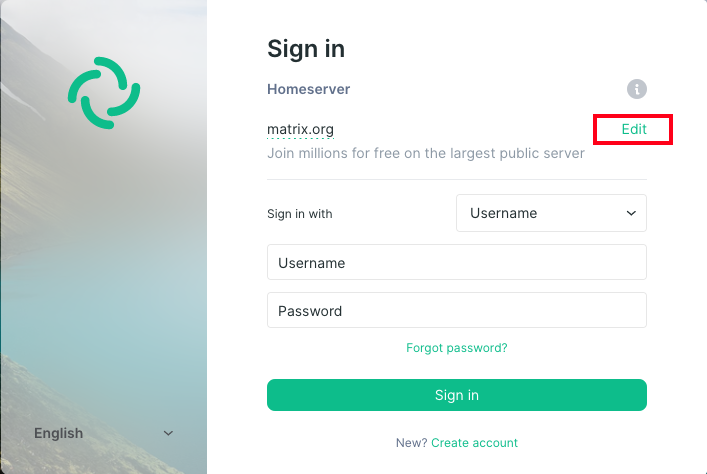
When logging in, select Other homeserver and enter the address below.
Your encryption recovery key protects your entire message history. If you lose it, your messages are unrecoverable — even for us.
Don't skip this. When Element shows the security setup prompt on first login, complete it and save your key. If you dismiss it and later lose access, your message history is gone permanently — no recovery possible, not even by us.
When you log in on a new device, Element will show an "unverified session" warning — this is normal, not a security breach. Verify by approving from an existing device, or use your recovery key. Until verified, some encrypted messages may not load.
Once you're set up, join the main Badlands room to say hello, get help, or just hang out.
The first link opens directly in chat.badlands.pw. The second works with any Matrix client.
Make sure you selected "Other homeserver" and entered matrix.badlands.pw exactly. Don't use the default matrix.org server.
Your session may be unverified. Go to Element settings → Security → verify your session from another device or enter your recovery key.
Encrypted messages before the loss are unfortunately gone. Reset your key in settings — future messages will be recoverable from that point forward.
Visit the FAQ or reach out via the support page. You can also ask in the Badlands room above.
Badlands runs on personal hardware with no corporate funding. If you find it useful, consider helping keep it online.